
Syncline
Syncline is a Shopify app that keeps your products and inventory in continuous two-way sync with a Google Sheet. Your spreadsheet stops being an export. It becomes your catalogue.
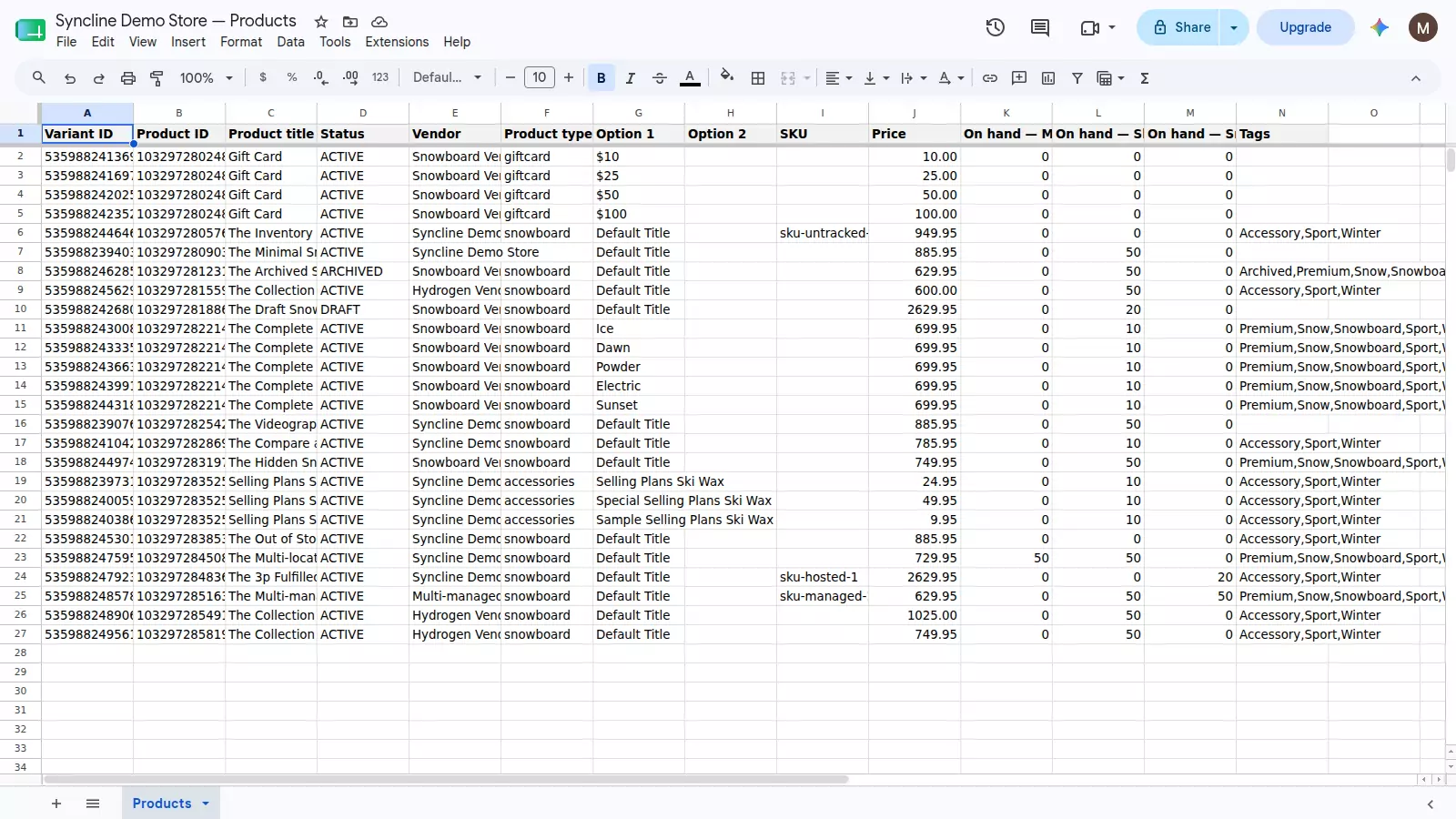
Your catalogue, as a sheet — one row per variant, with stock broken out per location.
How the sync works

Edit either side and the other catches up on its own — usually within seconds, whichever way the change started.
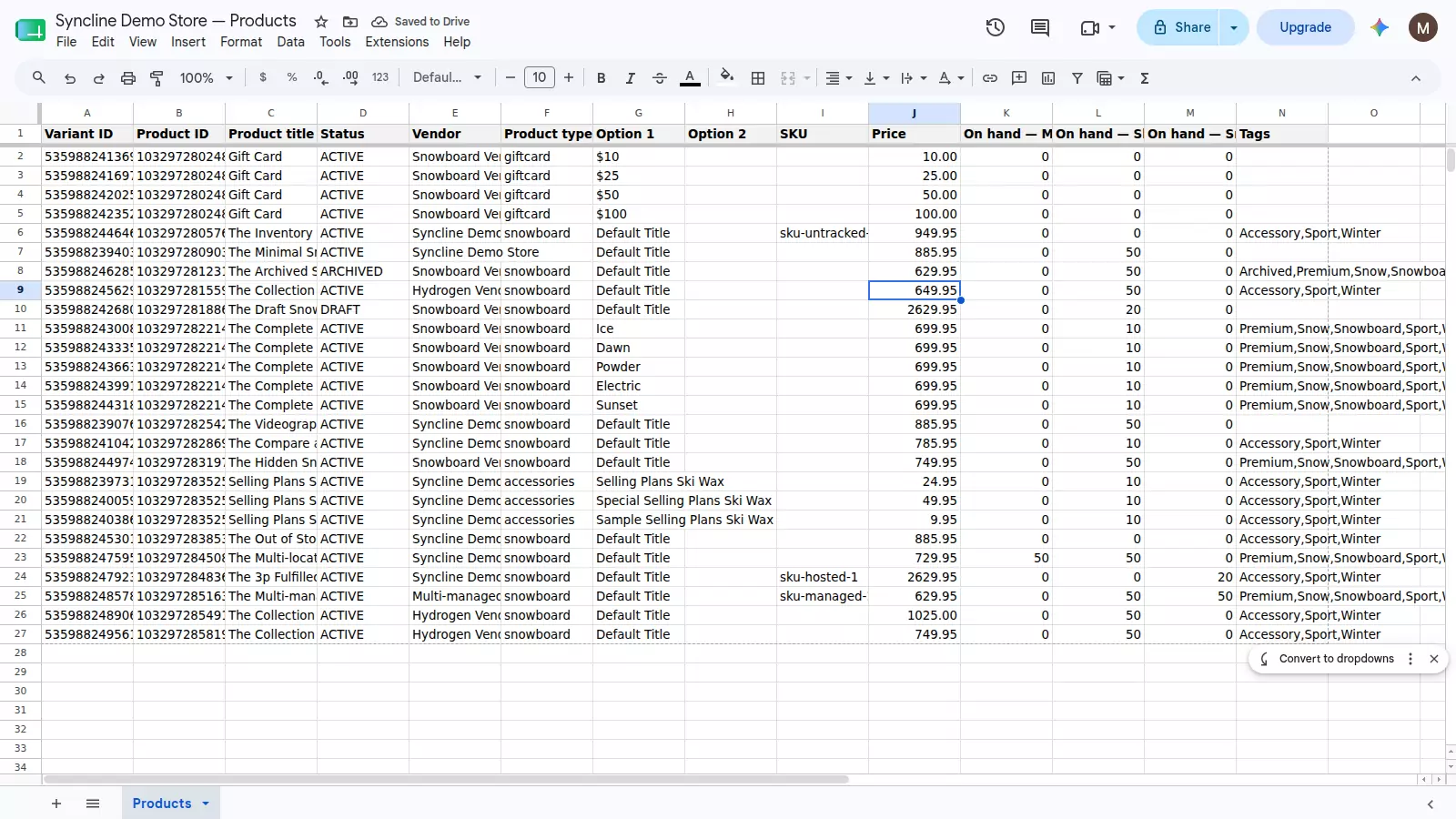
1. Type a new price into the sheet.
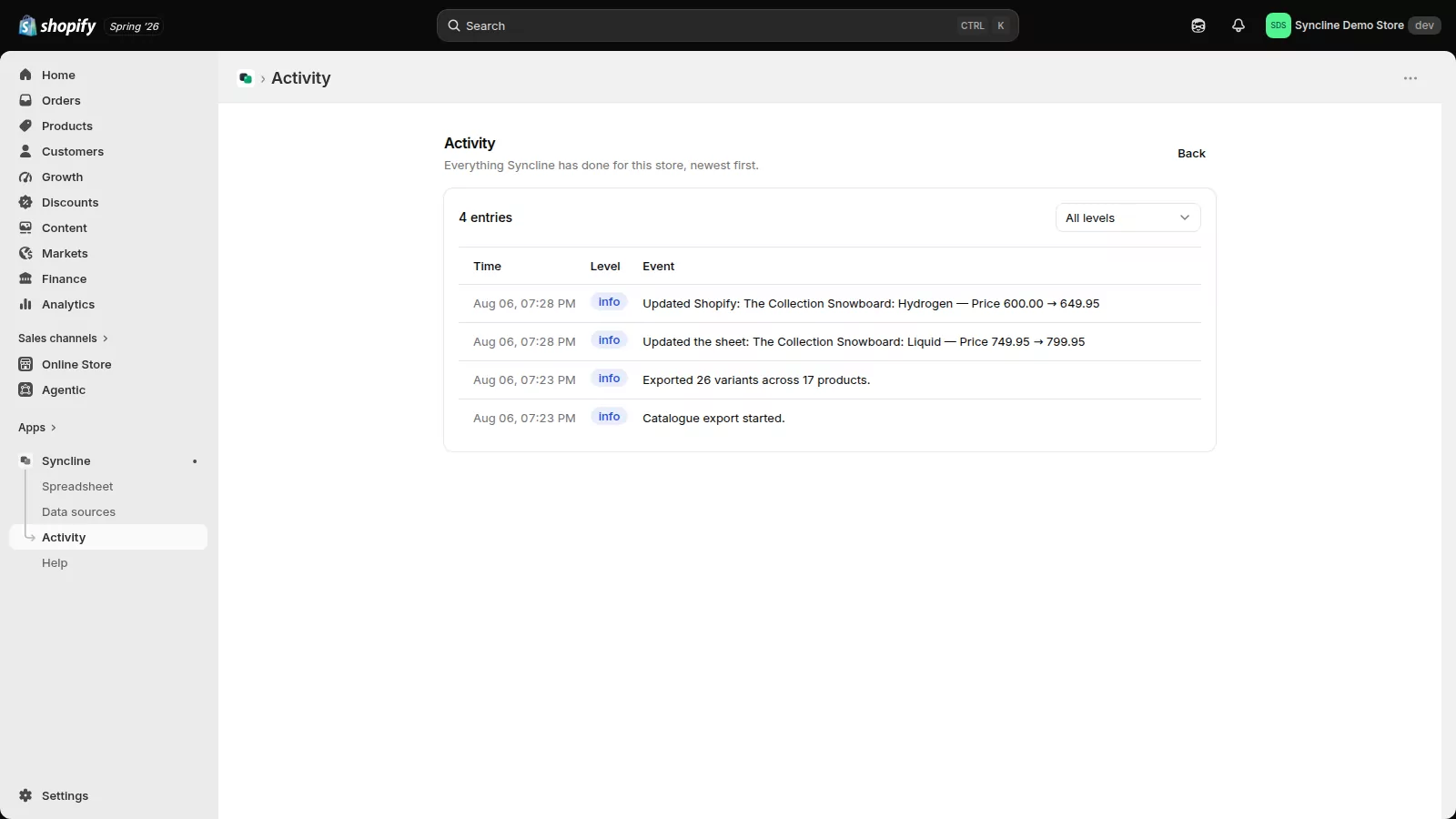
2. Seconds later it is in Shopify, and the change is on the record — the same product and the same price.
Built for teams who run the catalogue in a spreadsheet
Bulk-editing a catalogue in the Shopify admin is slow, and a CSV export is stale the moment it lands. Syncline removes the export step entirely. It creates one spreadsheet in your Google Drive, fills it with your catalogue, and then keeps both sides current — edits in the sheet are written to Shopify, and changes made in Shopify are written back to the sheet.
Every field is under your control. You choose which columns appear, what order they sit in, and which way each one flows: two-way, Shopify to Sheet, or Sheet to Shopify.
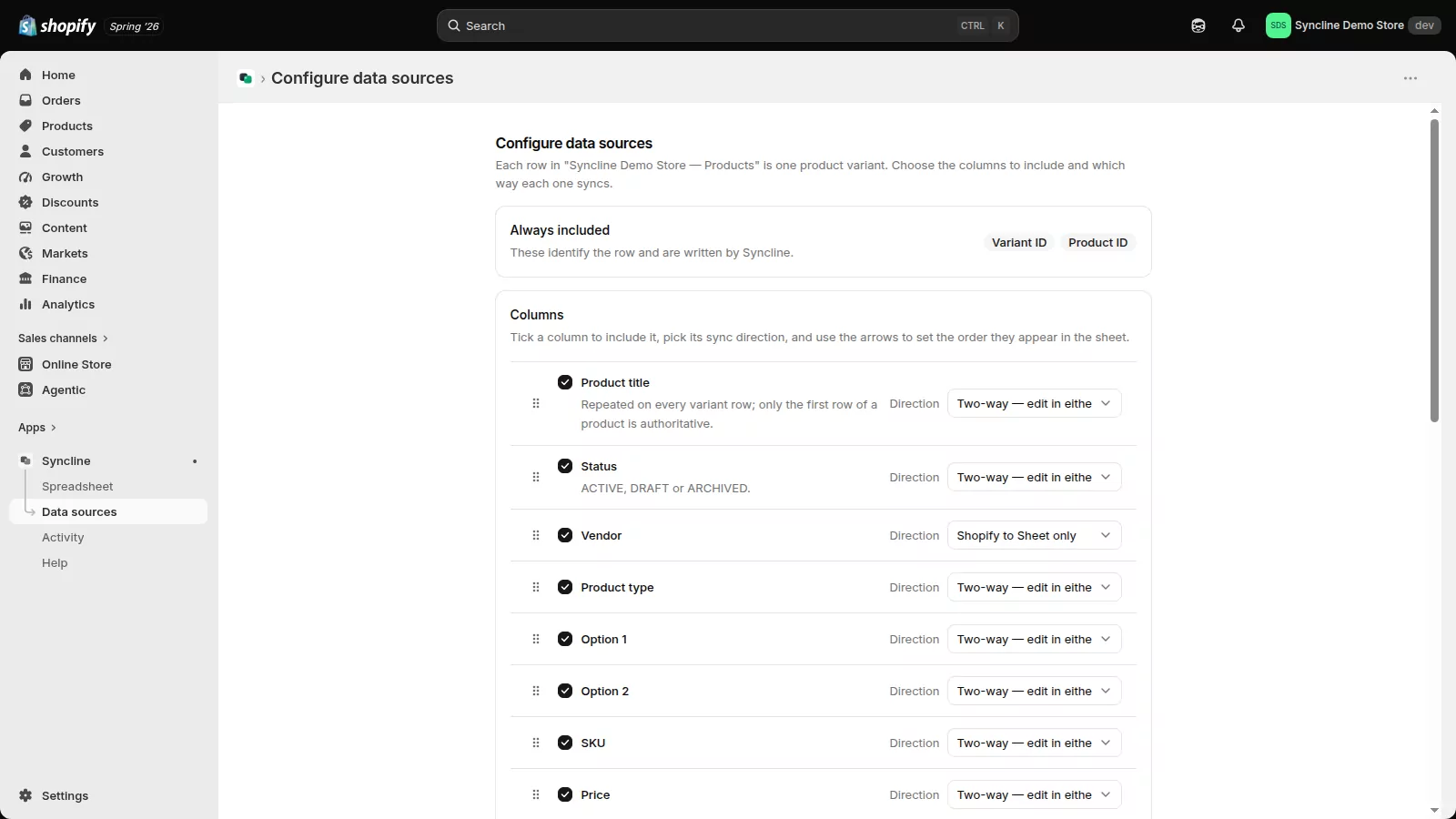
Price moves both ways; Vendor is read-only from Shopify. Set per column, changeable at any time.
| What syncs | Fields |
|---|---|
| Product | Title, status, vendor, product type, tags, description |
| Variant | SKU, barcode, price, compare-at price, options 1–3 |
| Inventory | On-hand stock, per location, with a read-only available column alongside |
| Identity | Variant ID and product ID, written and maintained by Syncline |
Why teams choose Syncline
Genuinely bidirectional
Not an export with an import bolted on. Shopify webhooks push changes into your sheet as they happen, and Google Drive push notifications carry your sheet edits back — usually within seconds.
Conflicts are surfaced, not silent
Every write is compared against a stored baseline and the live values on both sides. When two people change the same field, the later edit wins and the overwrite is recorded field by field, with a link straight to the affected row.
Destructive by nobody’s accident
Deleting a row never deletes a product — it is flagged for review instead. Removing a column tells you exactly what will be dropped before you confirm it.
Inventory that means one thing
Stock is tracked per location, and the number you edit is on-hand — the physical count. Shopify’s derived available figure is shown but never written back, so a stale cell cannot quietly inflate your warehouse. How inventory sync works
Least-privilege by design
Syncline uses Google’s drive.file scope — access to the one spreadsheet it creates for you and nothing else in your Drive. It never requests your customers, orders or payment data.
Exports that finish
The first export runs through Shopify’s bulk operations API, so your whole catalogue loads in a single pass — without timing out or tripping rate limits.
Nothing to maintain
Live-sync channels renew themselves, a scheduled check runs every fifteen minutes as a safety net, and a deeper sweep reconciles both sides daily. There is no script for you to install or keep alive.
Running in a couple of minutes
Connect Google
About ten seconds. Approve the spreadsheet permission on Google’s consent screen — Syncline needs it to create your sheet.
Create your spreadsheet
Name it, and Syncline creates it in your Drive. It belongs to you and stays with you.
Choose your columns
Tick the fields you want, drag them into the order you like, and set each one’s direction. Your catalogue exports into the sheet automatically.
Live sync switches on
It arms itself after the first export. From then on both sides stay current, and the dashboard shows every sync event as it happens.
Plans
| Free | |
|---|---|
| Variants synced | Up to 500 |
| Updates sheet to Shopify | 50 per day |
| Updates Shopify to sheet | 50 per day |
| Two-way sync, all fields | Included |
| Live sync and scheduled reconciliation | Included |
| Conflict log and activity feed | Included |
Guides
Bulk edit Shopify products in a spreadsheet
Edit prices, SKUs, titles or stock for as many rows as you like, without the limits of Shopify's admin bulk editor.
Read more →Shopify inventory in Google Sheets, per location
Why on-hand is the number to edit, and how a per-location column keeps every stock figure unambiguous.
Read more →A live alternative to CSV export and import
The common re-import failure modes, and how a live-synced sheet replaces the export/import cycle entirely.
Read more →Security & trust
Built to be trusted with a live catalogue, not bolted on after the fact.
Encrypted at rest
Shopify and Google access tokens are encrypted with AES-256 before they’re ever stored.
Least-privilege scope
Google access is limited to the one spreadsheet Syncline creates in your Drive — nothing else, ever.
Erasable on uninstall
Access is revoked immediately, and a compliance webhook erases your stored data automatically.
No customer or payment data
Syncline only touches products, inventory and locations — never orders, customers or payments.
Permissions, in plain terms
Syncline asks Google for permission to create and manage one spreadsheet in your Google Drive — the one it makes for you. That is the drive.file scope, which grants access only to files the app itself creates, so Syncline cannot see, list or open anything else in your Drive. It also reads your Google account’s name and email address, purely to show which account is connected.
On the Shopify side it requests read and write access to products and inventory, and read access to locations. Nothing else. Disconnecting revokes Syncline’s access at Google immediately; your spreadsheet stays exactly where it is.
Full details are in the Privacy Policy and the Terms of Service.
Frequently asked questions
How fast does a change actually sync?
Usually within seconds in both directions. Shopify notifies Syncline by webhook, and Google notifies it when your sheet changes. A scheduled check every fifteen minutes catches anything a missed notification would otherwise leave behind.
What happens if I delete a row?
Nothing is deleted in Shopify. The row is flagged in your activity feed for review, so an accidental deletion can never remove a product from your store.
How do new products in Shopify reach my sheet?
Automatically. When a product is created in the Shopify admin, the webhook adds its rows to your spreadsheet — no re-export needed. Syncline syncs edits to your existing catalogue; it does not create products from new spreadsheet rows.
What if someone edits the same product in both places?
Syncline compares both sides against a stored baseline before writing anything. The later edit wins, and the value it replaced is recorded in the activity log with a link to that exact row.
Can I control which columns sync, and which way?
Every column individually. Set it to two-way, Shopify to Sheet, or Sheet to Shopify, and reorder columns by dragging — existing data moves with them, with no re-export needed.
How does inventory work across multiple locations?
Each location gets its own column, so a number always means stock in one specific place. You edit on-hand — the physical count. Shopify’s calculated available figure can be shown alongside, read-only.
Can Syncline see the rest of my Google Drive?
No. The drive.file scope limits access to files the app itself created — that is your Syncline spreadsheet and nothing else.
What happens when I uninstall?
Syncing stops and Syncline’s access is revoked at Google. Your spreadsheet stays in your Drive with all its data, and your Shopify catalogue is untouched.
Is there a catalogue size limit?
Syncline syncs up to 500 variants. The initial export runs through Shopify’s bulk operations API, so loading them is fast regardless of how your catalogue is structured.
Is there a paid plan?
No. Syncline is free, and syncs up to 500 variants. There is no paid tier today.
Get started
Install Syncline from your Shopify admin and connect Google. Syncline creates the spreadsheet and fills it with your catalogue. Setup takes a couple of minutes.
Questions: syncline@secondactlabs.io