
Bulk edit Shopify products in a spreadsheet
Edit prices, SKUs, titles or stock for as many rows as you like in a Google Sheet, save, and Syncline applies the changes to Shopify — usually within seconds. No export, no re-import, no file to keep track of.
What the Shopify admin bulk editor cannot do
Shopify's own bulk editor is a genuine grid, but it is scoped to what fits on screen and edited a page at a time. A price change that depends on cost, a margin target, or a rule that varies by product type is not something the admin grid computes for you — you work it out elsewhere and type in the result.
A spreadsheet is where that arithmetic already lives. Syncline's difference from a CSV round-trip is that the sheet stays connected: an edit does not wait for an export step, and it does not go stale the moment someone changes the same product in the admin.
What you can bulk edit
Product level: title, status, vendor, product type, tags and description. Variant level: SKU, barcode, price, compare-at price and up to three options. Inventory: on-hand stock, per location. Each column has its own sync direction, so you can make a field editable from the sheet, or read-only and just there for reference.
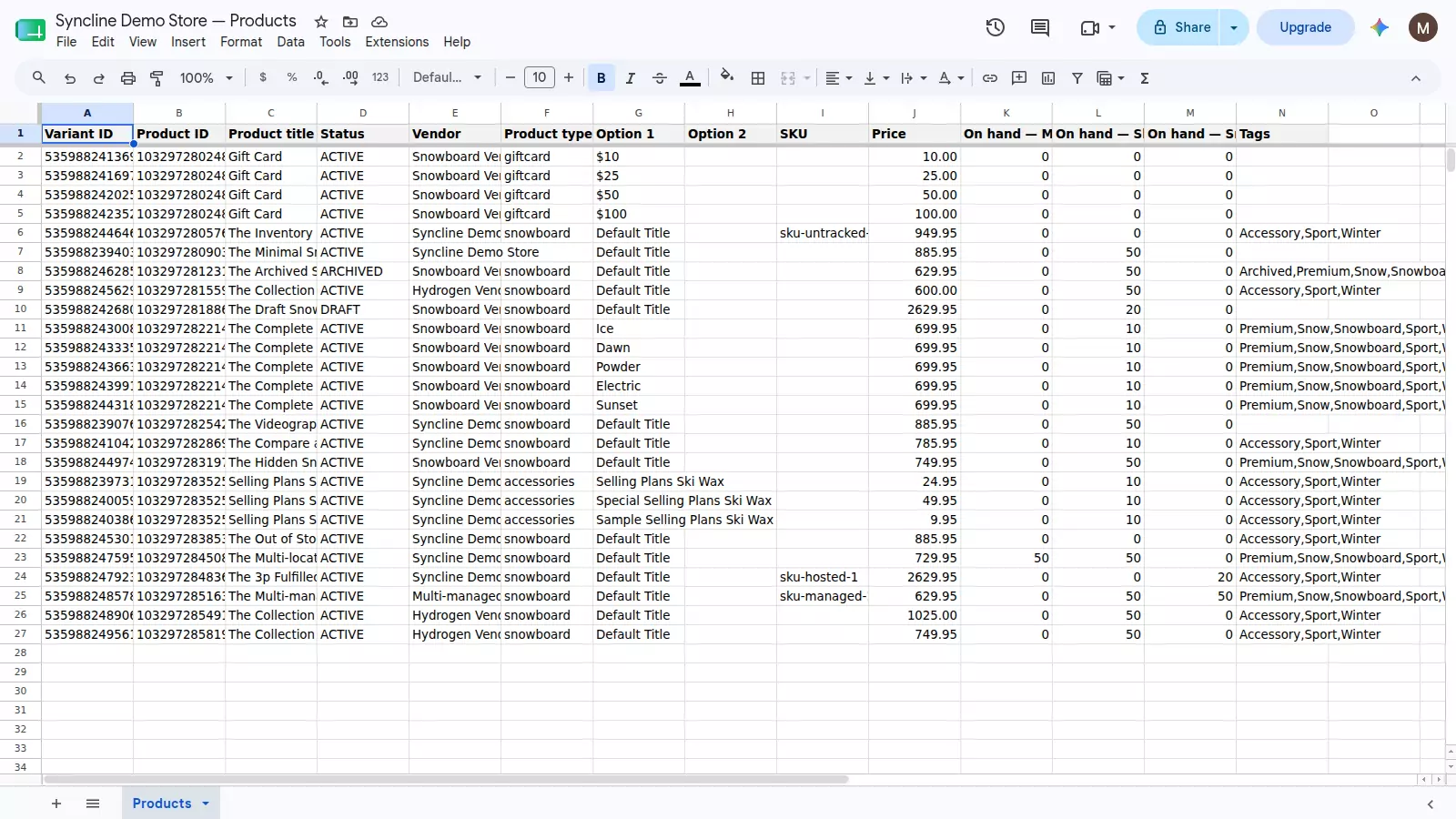
What a spreadsheet edit cannot do
Adding a row to the sheet does not create a product. A row with no Variant ID is a candidate for creation, and Syncline deliberately does not act on it: an edit that goes wrong is recoverable, a product that gets invented by mistake is a bigger problem to clean up. This is a considered limit, not an oversight.
The direction that does work: create the product in the Shopify admin, and it appears in the sheet on its own, ready to bulk edit alongside everything else.
What happens on a mistake
Before writing anything, Syncline compares the sheet's value against the value it last recorded. If a row changed elsewhere in the meantime — another edit, another app, a sale moving stock — the sheet still wins, but the value it replaced is written to an activity log with a link straight back to the row. A bulk edit is never applied silently over a change you did not know about.
Deleting a row does not delete a product either. It is flagged for review instead, so a bulk cleanup pass on the sheet cannot remove anything from your store by accident.
Frequently asked questions
Can I bulk edit Shopify prices from a spreadsheet?
Yes. Edit the price column for as many rows as you like and save the sheet — Syncline applies every changed row to Shopify, usually within seconds, without an export or import step.
Can I create new products by adding rows?
No. A row with no Variant ID is a candidate for creation, but Syncline does not act on it — getting an edit wrong is recoverable, inventing a product is messier. New products are created in Shopify and appear in the sheet automatically.
What happens if I bulk edit a value by mistake?
Nothing is destructive to undo blind. Syncline compares against the value it last saw before writing, and if the row was already flagged as changed elsewhere, the overwrite is recorded in the activity log with the previous value.
Which fields can I bulk edit this way?
Title, status, vendor, product type, tags and description at the product level; SKU, barcode, price, compare-at price and up to three options at the variant level; and on-hand stock per location.
Is there a limit on how many rows I can bulk edit?
Syncline syncs up to 500 variants, and it is free — there is no paid tier today.
Getting started
Install Syncline from your Shopify admin and connect Google. It creates the spreadsheet and fills it with your catalogue, ready to bulk edit. Setup takes a couple of minutes.